



Overview
Most prayer time apps come loaded with ads, require account sign-ups, and collect user data. Muslims deserve better: a clean, reliable, privacy-first tool that just works.
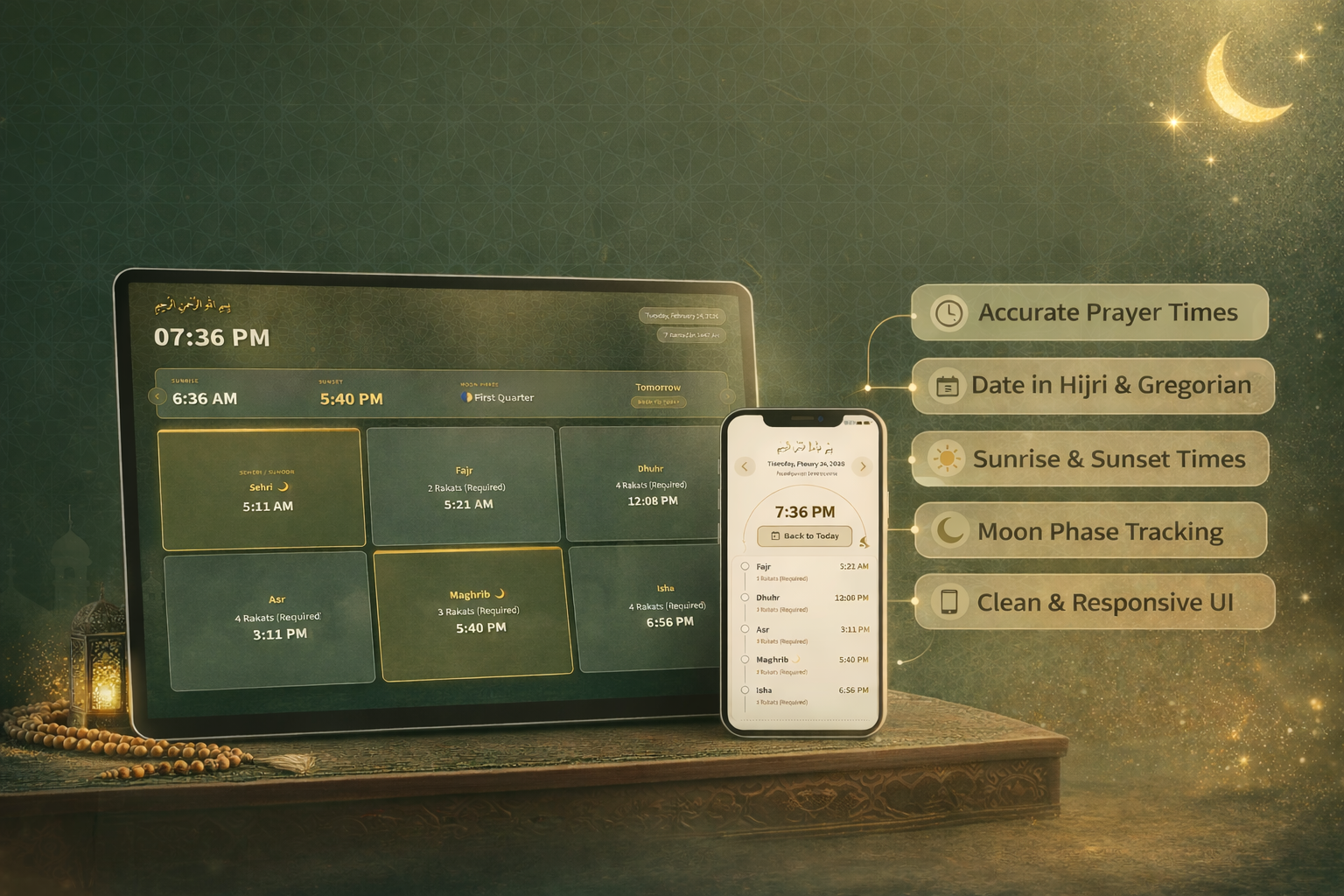
Nimazi is a progressive web app I designed and built from scratch to give Muslims accurate prayer times anywhere in the world, with no account required, no ads, and no tracking. Built entirely with vanilla JavaScript and zero dependencies, it installs directly to the home screen on iOS and Android and works offline through localStorage caching.
The app is live at nimazi.com and is fully open source on GitHub.
The Problem
Finding a trustworthy, well-designed prayer time app shouldn't be a chore. Yet for most Muslims, that's exactly what it is. The market is dominated by apps that treat users as a product rather than as people.
Ad-Cluttered Experiences
The majority of free prayer apps are monetized through intrusive advertising. Banner ads sit directly beneath the next prayer countdown, pop-ups interrupt during prayer time, and interstitials appear when switching between screens. The spiritual context makes this especially jarring.
Mandatory Accounts and Tracking
Many apps require email registration or social login before showing prayer times, a feature requiring nothing more than a city name and a timezone. Behind the scenes, these apps collect location history, usage patterns, and behavioral data. Users wanting something simple and private had no good option.
Poor PWA and Home Screen Experience
Despite how frequently Muslims check prayer times throughout the day, most apps haven't been optimized for home screen installation. They don't handle iPhone safe areas correctly, don't cache for offline use, and lose their URL bar when installed, breaking the user experience.
One-Size-Fits-All Design
Prayer habits shift significantly during Ramadan, when Tarawih and Suhoor add new rhythms to the day. And families with children have different needs than individual users. Existing apps offered no theming or contextual adaptability.
The prayer app market was crowded with ad-heavy, account-gated experiences that prioritized monetization over user trust
The Solution: Privacy-First and Purposeful
Nimazi was built on a simple principle: give Muslims exactly what they need and nothing they don't. Accurate times, a clean interface, and complete privacy. No account. No ads. No tracking.
Location Without Compromise
Prayer times require a location, but getting that location doesn't require an account. Nimazi offers two paths:
- Type any location: City name, postal code, or full address with real-time autocomplete suggestions powered by the Komoot Photon API
- GPS detect: One tap to pull the device's coordinates via the Geolocation API, with reverse geocoding to confirm the detected location
Settings are stored locally in the browser. Nothing leaves the device.
Accurate Times, Offline-Ready
Prayer times are fetched from the Aladhan API using the ISNA calculation method and cached in localStorage for the surrounding three days. If a user opens the app without a connection, they still see today's prayer times immediately with no loading state.
The main screen with live countdown, prayer grid, and Hijri calendar date display
Design Decisions
Nimazi needed to feel considered and calm. The interface would be opened multiple times daily, at varying levels of focus, from morning Fajr before sunrise to late-night Isha. Every design decision was evaluated against that context.
Themes Built for Real Life
Three distinct themes serve different contexts:
- Default (green): Deep forest green with white typography. Clean and focused for everyday use
- Ramadan (golden): Warm golden tones that shift the app's mood to match the spiritual intensity of the holy month. Auto mode switches to this theme automatically during Ramadan
- Kids (colorful): A high-contrast, playful palette designed for families introducing children to the five daily prayers
Three themes serve different users and contexts. Auto mode detects Ramadan dates and switches automatically
Navigation for Glanceability
The most important information, the next prayer and its countdown, occupies the top third of the screen. The full five-prayer grid sits below it. Supporting screens like Settings and the Prayer Guide live behind a persistent bottom navigation bar on mobile and a side nav on desktop.
Date Navigation with Hijri Support
Users can browse prayer times up to 30 days forward or backward. Both the Gregorian and Hijri Islamic calendar dates are shown, since the Islamic calendar is important context for many users, especially during Ramadan and the months surrounding Hajj.
Prayer Detail Cards
Tapping any prayer opens a modal with the prayer's name in Arabic, the number of Rakats, and a short description of its significance. This turns a utility into a learning tool, especially useful for newer Muslims or curious family members.
Tapping any prayer reveals Rakats, Arabic name, and context for that prayer
Key Features
Athan Audio Alerts
When a prayer time arrives, the app plays the Athan automatically and shows an alert modal. Users can choose from 10 recorded voices including Makkah, Madinah, Al-Aqsa, Al-Hussaini, Hafez, Minshawi, Naghshbandi, Saber, and Sharif. A preview button in Settings lets users audition each voice before committing.
Prayer Guide
A fully illustrated step-by-step prayer guide covers:
- Wudu (ritual purification): Nine-step illustrated guide for ablution before prayer
- Daily Salah: Complete guide to performing Fajr through Isha with Rakat counts and step-by-step instructions
- Tarawih: Ramadan night prayer guide with five steps
- Eid Prayer: Preparation and two-Rakat Eid prayer guide
PWA and Kiosk Mode
Nimazi installs as a full-screen standalone app on both iOS (via Safari's Add to Home Screen) and Android (via Chrome's Install App prompt). For mosques and Islamic centers, it also supports kiosk mode through Fully Kiosk Browser, turning a tablet into a dedicated prayer clock for the prayer hall.
Nimazi installs to the home screen like a native app and supports kiosk mode for mosque tablets
Onboarding for New Users
First-time visitors see a friendly onboarding modal that walks them through entering a location. It removes friction immediately, so users never land on an empty screen or have to hunt for Settings.
Technical Approach
Nimazi was built deliberately without frameworks or build tools. This wasn't a limitation but a choice. A zero-dependency codebase means faster load times, no supply chain vulnerabilities, no version conflicts, and complete transparency for open source contributors.
Vanilla JavaScript Architecture
The app is organized into four JavaScript files with clear responsibilities:
- utils.js: Shared utilities including Ramadan date constants, GPS location detection, and autocomplete logic
- app.js: Core prayer times logic, API fetching, caching, clock and countdown timers, Athan playback, and modal management
- settings.js: Settings form prefilling, theme and voice selection, and localStorage persistence
- guide.js: Expandable section animations and theme application for the prayer guide
Caching Strategy
Prayer times are cached in localStorage under the key athanClockPrayerCache. The cache stores times for the three surrounding days (yesterday, today, tomorrow) and automatically cleans up entries older than seven days. If the user changes their location or theme settings, the cache is invalidated and fresh data is fetched.
Timezone-Aware Clock
A common failure in prayer apps is showing times in the device's local timezone rather than the location's timezone. Nimazi extracts the timezone identifier from the Aladhan API response and uses the Intl.DateTimeFormat API to ensure the displayed clock and prayer times always match the selected location, even when traveling.
Zero dependencies, local caching, and timezone-aware time display at the core of the architecture
Impact
A Tool Muslims Can Trust
Nimazi exists because Muslim users deserve a prayer companion that respects them. No ads interrupting a moment of reflection. No mandatory account for a feature that needs nothing more than a city name. No data collection dressed up as personalization.
Open Source Community
The full source is available on GitHub with a contributing guide that makes it accessible to developers of all experience levels. This enables the global Muslim developer community to audit the code, contribute improvements, and fork the project for local adaptations.
Accessible Beyond the Browser
The kiosk mode capability means Nimazi can serve mosques and Islamic centers as a shared prayer clock, extending the app's utility beyond individual devices to community spaces.
Lessons Learned
- Context shapes every decision: An app used five times a day at varying energy levels needs to be glanceable above all else. Hierarchy and speed of comprehension matter more than visual richness.
- Zero dependencies is a feature: Building without frameworks forced clearer thinking about what the app actually needs to do. The result loads faster, is easier to audit, and welcomes more open source contributors.
- Privacy is a design principle: Designing around "what data do we need?" rather than "what data can we collect?" led to a more focused, trusted product. The constraint made the product better.
- PWA polish matters: The difference between a PWA that feels native and one that doesn't often comes down to small details: safe area handling, correct manifest configuration, and reliable offline behavior. These details are worth getting right.
- Spiritual context demands respect: Designing for religious practice requires a different mindset than designing for utility apps. The interface needs to feel calm and considered, never demanding or interruptive.