


AktivGrid
A patented organic molecule drawing experience with chemical intelligence
Overview
Drawing organic molecules shouldn't feel like fighting with software. Yet for chemistry students, that's exactly what traditional digital tools felt like: restrictive, assessment-focused, and disconnected from how chemists actually think about molecular structures.
AktivGrid reimagined molecule drawing as a learning experience rather than an evaluation tool. As the sole designer, I built an interactive system that enables students to visualize and construct resonance structures, chair conformations, Newman projections, Fischer diagrams, lone pairs, and curved-arrow mechanisms, all with real-time feedback that helps them learn from their mistakes rather than just marking them wrong.
The result was a U.S. Patent (#12,347,531 B2) and a tool adopted by over 5,000 institutions in General and Organic Chemistry courses.
The Problem
Traditional digital chemistry tools had a fundamental disconnect. They were built for assessment, testing whether students could produce the correct answer, rather than for learning. This created several critical problems:
Students Preferred Paper Over Digital
In user interviews with curriculum designers and chemistry professors, I heard the same story repeatedly: students would rather sketch on paper than use existing digital tools. The software felt restrictive and didn't support nuanced learning concepts like resonance structures, curved arrow mechanisms, chair conformations, and conformational analysis.
No Room for Mistakes
Existing tools marked answers as simply right or wrong, with little guidance on why an answer was incorrect or how to improve. This binary feedback model doesn't align with how students actually learn chemistry: through experimentation, hypothesis testing, and iterative refinement.
Disconnected from Chemical Thinking
The tools didn't reflect how chemists actually think about and teach molecules. They focused on input mechanics rather than chemical concepts. Students needed to understand formal charges, octet rules, electron movement, and structural relationships, but the tools provided no support for developing this understanding.
Expensive and Inaccessible
The few available alternatives were prohibitively expensive, costing over $1,500 per license. Even worse, they were desktop-only applications with no online version, forcing instructors to manually collect and review files via email. This created significant workflow friction and made remote learning nearly impossible. The cost barrier meant many institutions couldn't provide these tools to students at all, widening educational inequity.
User interviews revealed students preferred sketching on paper due to restrictive digital tools
The Solution: Chemical Intelligence
Rather than building another assessment tool, I designed AktivGrid as a learning environment with built-in chemical intelligence. The system understands chemistry rules and provides real-time feedback that helps students discover errors and understand concepts.
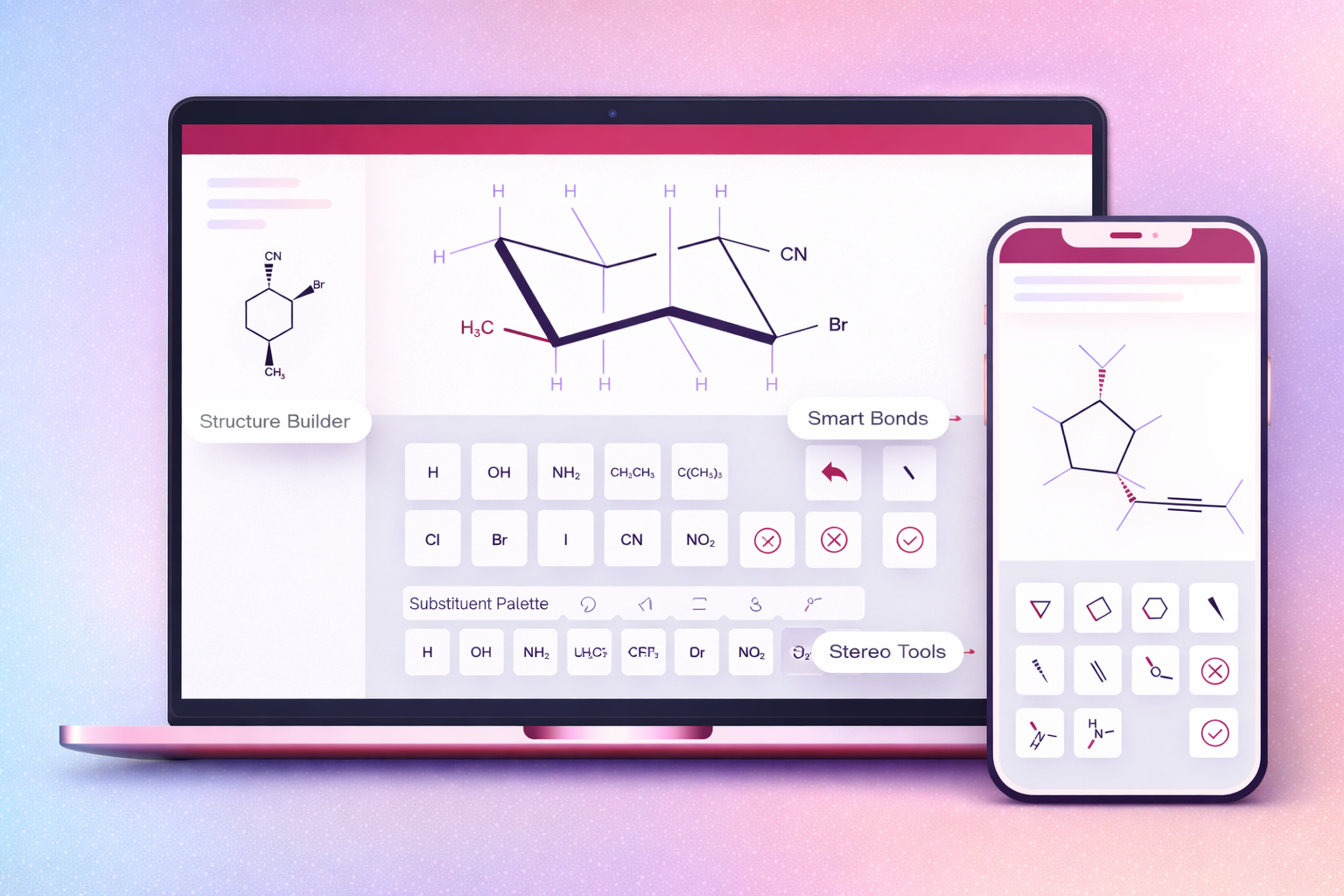
Smart Drawing Interface
The interface supports both hexgrid-based and free-form drawing modes, allowing students to work naturally while the system maintains chemical validity. Students can:
- Draw molecular structures: Create cyclic and acyclic compounds with intuitive touch or mouse controls
- Add functional groups: Quickly insert common groups like carbonyls, amines, alcohols, and aromatic rings
- Manipulate bonds: Switch between single, double, triple bonds, and wedge/dash notation for stereochemistry
- Place electron pairs: Add lone pairs and formal charges with visual feedback on octet rules
- Draw reaction mechanisms: Use arrow tools to show electron movement in curved-arrow notation
Real-Time Feedback System
The chemical intelligence engine validates structures as students draw, providing scaffolded feedback that guides learning without giving away answers:
- Formal charge validation: Highlights atoms with incorrect charges and suggests corrections
- Octet rule checking: Identifies atoms that violate electron configuration rules
- Stereochemistry guidance: Detects errors in R/S, E/Z, and cis/trans configurations
- Regiochemistry feedback: Catches mistakes in functional group positions and carbon chain structure
- Mechanism step validation: Evaluates each step in multi-step synthesis problems
Smart drawing interface with real-time chemical intelligence feedback
Design Process
As the sole designer, I managed the complete product lifecycle from research through implementation. The process was deeply collaborative with chemistry professors and curriculum designers who helped me understand the pedagogical requirements.
1. Research & Understanding
I started by immersing myself in how organic chemistry is taught and learned:
- Observed chemistry lectures: Watched how professors draw structures on whiteboards and explain mechanisms
- Student interviews: Understood pain points with existing tools and preferences for paper-based work
- Competitive analysis: Evaluated existing molecule drawing software (ChemDraw, MarvinSketch, etc.) to identify gaps
- Textbook study: Analyzed how chemistry concepts are visually represented in educational materials
2. Interaction Design Foundations
I developed visual interaction systems for the fundamental building blocks:
- Atoms and bonds: How to place, connect, and modify atomic structures intuitively
- Charges and electrons: Visual representations for formal charges, lone pairs, and radical electrons
- Stereochemistry: Wedge and dash notation for 3D spatial relationships
- Arrows and mechanisms: Tools for showing electron movement and reaction pathways
3. Iteration & Prototyping
Through multiple design cycles, I tested different approaches:
- Contextual sidebar vs. floating toolbar: Tested different UI patterns to minimize cognitive load
- Tap-to-place vs. drag interactions: Evaluated what felt most natural for mobile and desktop
- Grid-based vs. free-form: Explored constraints that guide without restricting
- Feedback timing: Determined when to show validation messages (immediate vs. on-demand)
4. Engineering Collaboration
I created interactive prototypes in Figma and worked closely with the engineering team to implement the validation logic. This required understanding the chemical rules well enough to specify edge cases and error states clearly.
Three-year iterative design process from research to patented product
Key Features
Advanced Drawing Capabilities
AktivGrid supports comprehensive organic chemistry visualization needs:
- Chair conformations: Interactive cyclohexane chairs with axial/equatorial position manipulation
- Newman projections: Rotatable conformational isomer visualization
- Fischer projections: Stereochemistry representation for carbohydrates
- Resonance structures: Tools for showing electron delocalization
- Lone pair builder: Placement and visualization of electron lone pairs on atoms
- Curved-arrow mechanisms: Electron pushing notation for reaction pathways
Flexible Instructor Controls
Professors can customize what tools are available for each question, scaffolding the learning experience:
- Tool toggles: Enable or disable specific features per assignment
- Partial credit options: Configure grading for partially correct structures
- Hint systems: Provide progressive guidance without giving away answers
- Multiple solution paths: Accept various valid approaches to the same problem
Mobile-First Design
Unlike desktop-only chemistry software, AktivGrid was designed for mobile from the ground up:
- Touch-optimized controls: Large tap targets and gesture-based interactions
- Responsive layouts: Interface adapts from phone to tablet to desktop
- Performance optimization: Fast rendering even on older devices
- Offline capability: Core drawing features work without connectivity
Comprehensive toolkit supporting all major organic chemistry visualization needs
Technical Innovation
The patent-worthy innovation in AktivGrid wasn't just the interface. It was the underlying chemical intelligence system that validates structures and provides meaningful feedback.
Structure Validation Engine
The system analyzes molecular structures using chemical rules to identify errors:
- Carbon chain validation: Detects incorrect bonding patterns and missing carbons
- Functional group recognition: Identifies missing or misplaced chemical groups
- Valency checking: Ensures atoms have correct number of bonds
- Stereochemistry analysis: Validates 3D spatial arrangements
Multi-Step Synthesis Grading
For complex mechanism problems, the system evaluates each step independently:
- Reagent validation: Checks if reagents are appropriate for each step
- Product evaluation: Verifies intermediate and final products
- Mechanism accuracy: Validates electron movement arrows
- Partial credit: Awards points for correct portions even if final answer is wrong
Mistake-Driven Learning
Rather than just flagging errors, the system provides guidance that helps students understand why something is wrong and how to fix it. This key pedagogical innovation made the patent possible.
Impact & Results
Widespread Adoption
AktivGrid became central to Aktiv's Organic Chemistry offering and was adopted by over 5,000 institutions. The tool replaced paper-based assignments and enabled remote chemistry education at scale.
Learning Outcomes
Students using AktivGrid demonstrated measurable improvements:
- Higher retention rates: Students reported better understanding of reaction mechanisms
- Fewer retries needed: Scaffolded feedback reduced trial-and-error guessing
- Increased engagement: Interactive visualization made abstract concepts concrete
- Better preparation: Students felt more confident in lab and exam settings
Business Impact
The tool became a competitive differentiator:
- Marketing centerpiece: Featured prominently in Aktiv's chemistry course materials
- Sales enablement: Demonstrations of AktivGrid closed deals with chemistry departments
- Patent protection: Secured intellectual property for the company
- Feature adoption: Increased enrollment in courses with visual learning components
U.S. Patent Achievement
The system's innovative approach to chemical intelligence and mistake-driven learning earned U.S. Patent #12,347,531 B2, recognizing the novel method of validating and providing feedback on molecular structure drawings in educational contexts.
Design Principles
Several core principles guided every design decision in AktivGrid:
1. Learning Over Assessment
Every feature was evaluated through the lens of "does this help students learn?" rather than "does this help us grade students?" This meant prioritizing real-time feedback, partial credit, and multiple solution paths over binary right/wrong evaluation.
2. Mistake-Driven Discovery
Mistakes are learning opportunities, not failures. The system was designed to make chemistry logic visible. When students drew an invalid structure, they could see exactly why it violated chemical rules and experiment with corrections.
3. Reflect How Chemists Think
The interface needed to mirror how chemists actually work with molecular structures by thinking in terms of functional groups, electron movement, and structural relationships rather than just positioning atoms on a grid.
4. Mobile-First, Not Mobile-Adapted
Rather than building for desktop and adapting to mobile, I designed for touch interaction first. This meant larger tap targets, gesture-based controls, and simplified toolbars that worked with thumbs, not just cursors.
5. Deep Subject Matter Collaboration
I couldn't design an effective chemistry tool without understanding chemistry. I worked closely with professors and curriculum designers throughout the process, learning not just what to build but why certain pedagogical approaches work.
Lessons Learned
- Domain expertise is essential: I couldn't design an effective chemistry tool without deeply understanding how chemistry is taught and learned. The time invested in research paid off exponentially.
- Tools must reflect pedagogy: The best educational technology aligns with teaching philosophy. AktivGrid succeeded because it embodied the mistake-driven learning approach that chemistry professors already used.
- Iteration requires subject matter experts: I needed chemistry professors to validate every design decision. Their feedback prevented me from building features that looked good but didn't support actual learning.
- Mobile-first changes everything: Designing for touch interaction fundamentally reshaped the interface. Features that worked well with a mouse often needed complete reconceptualization for fingers.
- Intelligence enables simplicity: The smarter the validation system, the simpler the interface could be. Students didn't need complex controls because the system understood chemistry and could guide them.
- Patents require novel approaches: The patent wasn't awarded for the interface design. It was awarded for the innovative method of providing chemical intelligence feedback in educational contexts.